Guided invoice recovery · iPhone now, web soon
Stop improvising. Recover overdue invoices with a clear process.
Duesteer helps freelancers and small businesses track overdue invoices, choose the right next step, and send professional payment follow-ups without damaging client relationships.
Free to manage up to 2 invoices · No account required to get started.
The problem
Random reminders rarely get you paid
When follow-ups are inconsistent, badly worded, or simply forgotten, overdue invoices drag on. Clients aren't sure how serious you are, and you're left guessing what to send next.
Inconsistent wording
Every reminder sounds different, so none of them carry real weight.
Forgotten follow-ups
Without a system, the next step slips and invoices quietly age out.
Awkward escalation
It's hard to know when to get firmer — so most people never do.
How it works
A clear path from overdue to resolved
- 1
Add an overdue invoice
Enter the client, amount, and due date for an unpaid invoice. Everything stays on your device.
- 2
Review the recommended next action
Duesteer looks at where the invoice sits in the recovery process and suggests the right next step.
- 3
Send the professional follow-up
Generate a clear, appropriately worded reminder or escalation email and send it from your own email app.
- 4
Track responses, disputes, and outcomes
Log replies, disputes, and payment promises so you always know each invoice's real status.
The escalation ladder
Escalate professionally, one clear step at a time
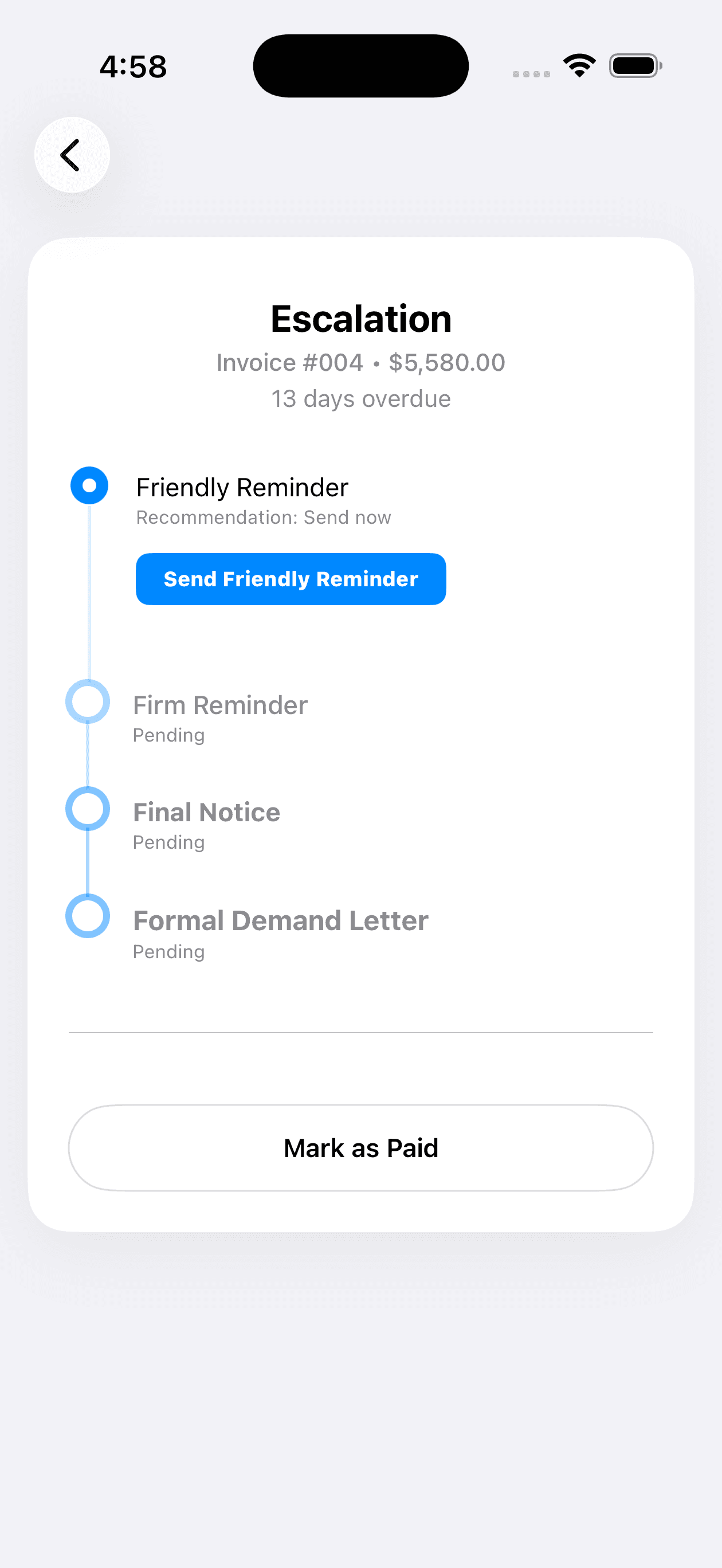
Duesteer moves each overdue invoice through a structured sequence, so every message is appropriate to how late the payment is.
Friendly Reminder
A light, polite nudge that assumes the invoice was simply overlooked.
Firm Reminder
A clear, professional message that restates the amount and the due date.
Final Notice
A direct notice that payment is now significantly overdue and needs attention.
Formal Demand
A formal, businesslike demand for payment with the outstanding details spelled out.
External Action
A prompt to consider outside options. Duesteer guides the step but does not provide legal advice.
Duesteer guides the recovery process but does not provide legal advice. For legal questions, consult a qualified professional.
Features
Everything you need to follow up with confidence
Purpose-built tools for invoice recovery — no accounting-system complexity.
Guided escalation ladder
Move each invoice through a clear sequence of stages instead of improvising every follow-up.
Client-aware communication
Choose a tone that fits the relationship, from a friendly nudge to a formal demand.
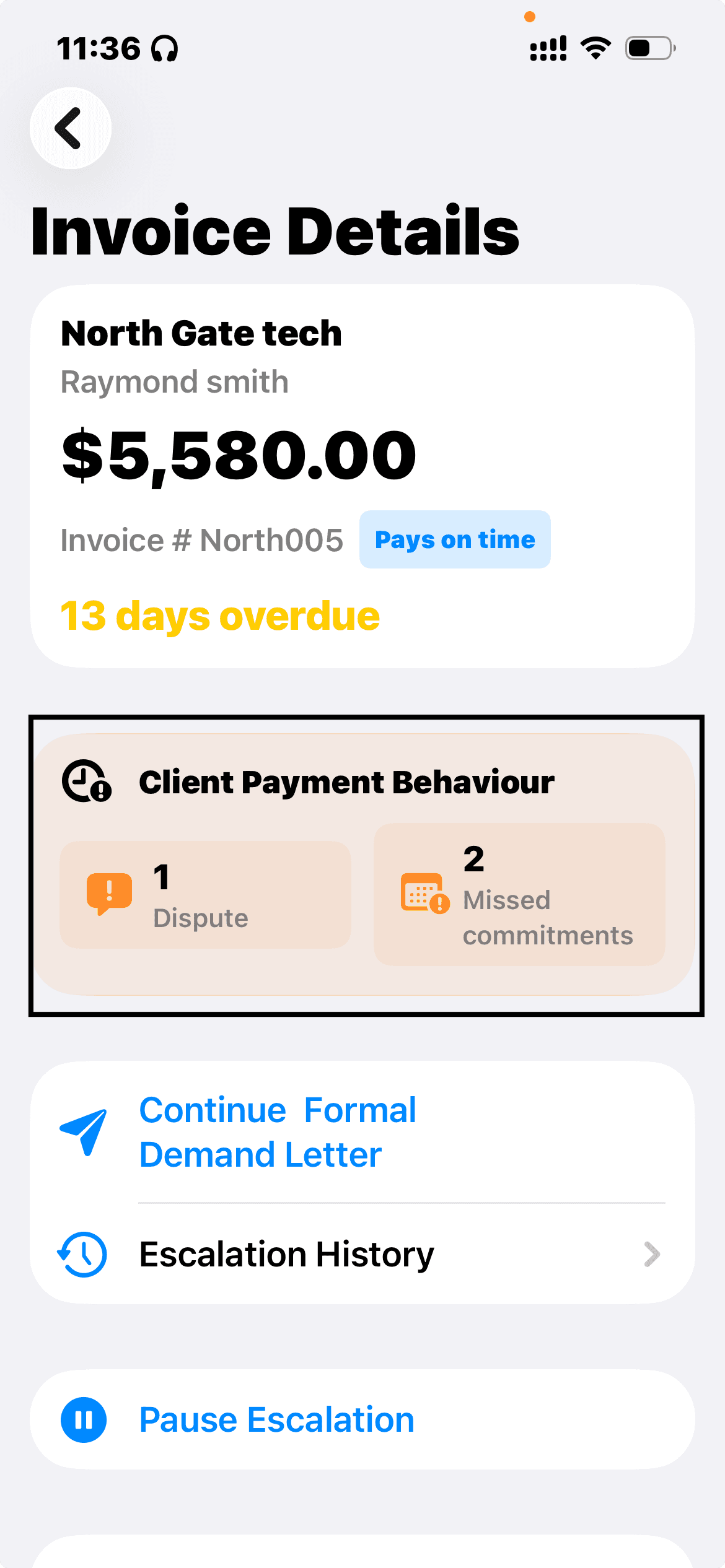
Disputes and payment commitments
Pause recovery when a client disputes an invoice or promises to pay, then continue at the appropriate time.
Recovery history
Keep a running record of every reminder, dispute, and promise for each invoice.
PDF export
Export a clean recovery history PDF for your records or to share with an accountant.
Local-first privacy
Invoice data is stored locally on your device — no cloud account required to track invoices.
Smart reminders
Get notified when it's time to follow up so overdue invoices don't slip through the cracks.
Clear invoice status
See at a glance which invoices are on track, waiting, disputed, or resolved.
Who it's for
Built for people who invoice their clients
Freelancers
Chase late payments professionally without spending your evenings drafting awkward emails.
Consultants
Keep engagements on solid financial footing with consistent, structured follow-ups.
Contractors
Recover payment for completed work with clear escalation steps you can rely on.
Agencies
Keep overdue client invoices moving through a consistent, professional recovery process.
Small service businesses
Stay on top of overdue invoices without adding heavy accounting software.
Privacy
Local-first by design
Duesteer keeps you in control of your data and your communications. Track unpaid invoices privately, without handing your books to another service.
Invoice data stays on your device
Your invoice details are stored locally — not in the cloud.
No accounting software required
Duesteer never asks you to connect accounting tools or bank accounts.
You control every message
You review and send each follow-up yourself. Nothing goes out automatically.
Pricing
Simple pricing that grows with you
Start free, upgrade when you need the full workflow.
Free
Manage up to 2 invoices.
- Up to 2 invoices
- Full guided escalation workflow
- Professional email templates
- All client communication styles
- Dispute and payment-promise tracking
- Smart notifications
- Recovery history
- PDF recovery reports
- External Action guidance
Premium Monthly
Most popularThe full recovery workflow, billed monthly.
- Everything in Free
- Unlimited invoices
- Access to future premium features
Premium Yearly
The full workflow at the best value.
- Everything in Premium Monthly
- Best value for regular invoicing
Subscriptions are managed through Apple. Pricing may vary by App Store region. Compare plans
FAQ
Questions, answered
A few of the things people ask most. See the full list on the FAQ page.
What is Duesteer?
Duesteer is an iOS app that helps you recover overdue invoices with a clear, professional escalation process. Instead of sending random reminders, you follow a guided ladder of steps and generate appropriate follow-up emails.
Who is it for?
Duesteer is built for freelancers, consultants, contractors, agencies, and small service businesses — anyone who invoices clients and occasionally has to chase late payments.
Does Duesteer work in my country?
Yes. Duesteer works wherever you invoice clients. The escalation workflow (reminders, final notice, formal demand, and recording disputes and payment promises) isn't tied to any one country's legal system. Formal steps such as demand letters, late fees, or court claims vary by jurisdiction, so check the rules where you and your client operate before relying on them. Duesteer guides the process but does not provide legal advice.
Does Duesteer send emails automatically?
No. Duesteer helps you generate professional reminder and escalation emails, but you review and send them yourself from your own email app. You stay in full control of every message.
Does Duesteer connect to accounting software?
No. Duesteer does not connect to accounting software, bank accounts, or payment processors. You add invoices manually, which keeps your data self-contained and under your control.
Take the guesswork out of getting paid
Give every overdue invoice a clear next step. Download Duesteer and recover late payments with a process you can trust.